New to the MPC production world? Got a music production question that's not really specific to any particular MPC? Try your luck here and get help from our experienced members.
User avatar
By deetee Mon Feb 17, 2025 5:43 am
Hi all!

I would like to trim a sample to a defined length - ie one second.

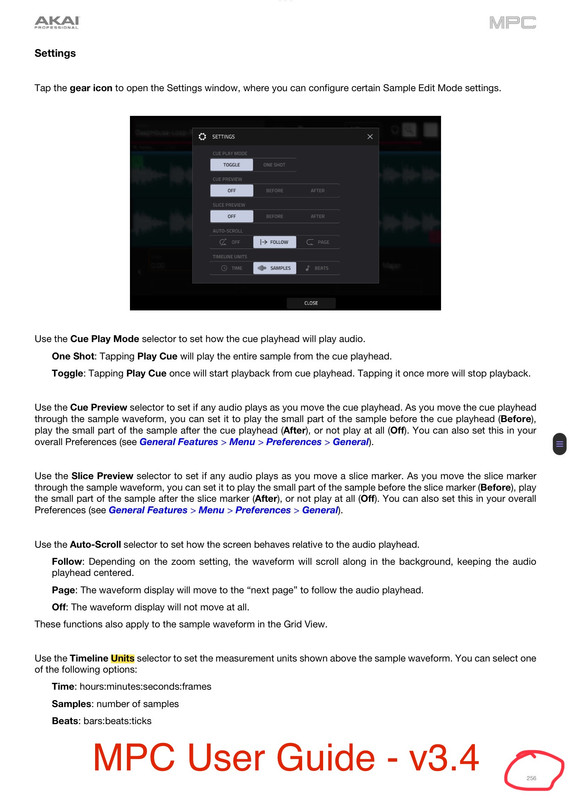
In SAMPLE EDIT the trimming end point is given in a number - approximately 41000 for a one second sample.

* What unit is this value?
* Is it possible to show this value in seconds (at least the timeline can be shown in seconds or beats)?
* What's the exact number/value for one second?

Thanks for any help
Regards

User avatar
By deetee Tue Feb 18, 2025 7:00 am
Thanks for the regarding Manual page. I did already read this page many times and knew how to change the 'timeline' unit. But it seems that there is no way to change the "Trim End Point Unit".

But meanwhile I found answers to some of my questions by myself:

I produced/trimmed a one second sample (set BPM to 240, so one bar is exactly one second - set BARS to one and recorded a sample (>1s) - then "bounced to sample" (MENU-Arrangement-Pencil) - produced a new sample with 1 BAR = 1s).
Finally the trim end point of this sample showed a value of 44100.

So it seems obvious that this fits a sampling rate of 44,1 kHz the MPC uses (Shannon Theorem for ear's limit of 22kHz). So the values for start and end points in SAMPLE EDIT show sample points as unit - and 44100 sample points correspond to one second.

Finally I verified this by loading a complete song as sample (Kraftwerk/Model 3min37s = 217s). The end point trim value showed (approximately) 9,569,700 (=217s*44100Hz).

Regards