Support and discussion for all of Akai’s modern standalone MPCs including the MPC X / X SE, MPC Live 1, 2 & 3, MPC One / One+, MPC Key 37/61.
By kantholz Mon Oct 06, 2025 12:05 pm
Elijah wrote:
kantholz wrote:Is it possible to trigger clips with an external controller? It would be so cool to do this.

Not at the moment, would be nice if it could be though.


I hope they implement it in future updates. Akai has enough controller hardware already on the market which would benefit from it. I would buy an APC64 immediately. MPC Live 3 is already on the way.
By kreativsein Mon Oct 06, 2025 4:18 pm
Hello, can anyone tell me what software comes with the MPC Live III? I mean specifically the included plugins, synths, etc.? I can’t find a list of the included packages anywhere.
By JackD Mon Oct 06, 2025 5:00 pm
B-Wise wrote:Glad to help.
Yes, holding the record button brings up a menu. I couldn't remember where that option was at. But when you do it that way, does it record every parameter change on all tracks or just on the Armed track(s)?


Changes are recorded for the entire project!
User avatar
By jaymack Mon Oct 06, 2025 5:40 pm
kreativsein wrote:Hello, can anyone tell me what software comes with the MPC Live III? I mean specifically the included plugins, synths, etc.? I can’t find a list of the included packages anywhere.


have you checked the akai website?
By mpc_fan_2022 Mon Oct 06, 2025 6:12 pm
kreativsein wrote:Hello, can anyone tell me what software comes with the MPC Live III? I mean specifically the included plugins, synths, etc.? I can’t find a list of the included packages anywhere.


Did you go to AKAI website and scroll down?

https://www.akaipro.com/mpc-live-3.html

It's the normative source of information.

Alternatively search "MPC LIVE III" FAQ on google:

https://support.akaipro.com/en/support/ ... -questions
By Shift Gorden Mon Oct 06, 2025 6:53 pm
Picked mine up on Friday, and I'm loving it.

Thanks, B-Wise, for solving the automation button thing - I was scratching my head about that earlier.

I'm really enjoying the feel of the new pads, and messing around with the quadrant triggers.

For me, the step sequencer is fire. Love not only sequencing using the 16 buttons, but the automation locks excite me.

Clip view works well for me as I've lived in Ableton Live for the last 20 years.

It's a smashing device - fast as hell.

I've just created a bit of a quandary for myself as I love my Key 61...first world problems for sure.
By B-Wise Mon Oct 06, 2025 7:48 pm
Shift Gorden wrote:Picked mine up on Friday, and I'm loving it.

Thanks, B-Wise, for solving the automation button thing - I was scratching my head about that earlier.

I'm really enjoying the feel of the new pads, and messing around with the quadrant triggers.

For me, the step sequencer is fire. Love not only sequencing using the 16 buttons, but the automation locks excite me.

Clip view works well for me as I've lived in Ableton Live for the last 20 years.

It's a smashing device - fast as hell.

I've just created a bit of a quandary for myself as I love my Key 61...first world problems for sure.


I'm happy it's all working out for you. Now, maybe you can clear up some confusion for me. The Live3 was giving the Pad FX macros from the Force, but the L3 pad macros can activated with the 16 Function buttons instead of the drums, which is how all the demos showed & this had been just to showoff the new 16 step pads. My question is, can they also be triggered from the drum pads.

In the Force there's in the Qlink menu there's a Pad Grid option where you set up the 4 banks of 16 for a total of 64 pad macros where one pad bank is on screen where you can tap, The Force pads can be put into Pad Grid/FX mode to be used to trigger the macro (cool way to set up 64 mute/solos for tracks/pads & have access to all at once) Can the MPC pads also be put in this mode?

By JackD Mon Oct 06, 2025 8:10 pm
B-Wise wrote:
Shift Gorden wrote:Picked mine up on Friday, and I'm loving it.

Thanks, B-Wise, for solving the automation button thing - I was scratching my head about that earlier.

I'm really enjoying the feel of the new pads, and messing around with the quadrant triggers.

For me, the step sequencer is fire. Love not only sequencing using the 16 buttons, but the automation locks excite me.

Clip view works well for me as I've lived in Ableton Live for the last 20 years.

It's a smashing device - fast as hell.

I've just created a bit of a quandary for myself as I love my Key 61...first world problems for sure.


I'm happy it's all working out for you. Now, maybe you can clear up some confusion for me. The Live3 was giving the Pad FX macros from the Force, but the L3 pad macros can activated with the 16 Function buttons instead of the drums, which is how all the demos showed & this had been just to showoff the new 16 step pads. My question is, can they also be triggered from the drum pads.

In the Force there's in the Qlink menu there's a Pad Grid option where you set up the 4 banks of 16 for a total of 64 pad macros where one pad bank is on screen where you can tap, The Force pads can be put into Pad Grid/FX mode to be used to trigger the macro (cool way to set up 64 mute/solos for tracks/pads & have access to all at once) Can the MPC pads also be put in this mode?


Hi

The Pad macros can be stored only on the sequencer buttons above, but they are actually 64 as you will have 16x4 Lines to use.

Hope this helps
Byeeez
By B-Wise Mon Oct 06, 2025 8:23 pm
JackD wrote:The Pad macros can be stored only on the sequencer buttons above, but they are actually 64 as you will have 16x4 Lines to use.


Thanks. I aware there's 64 pad macros & by default they're set to use the top pads, but in the Pad Grid or Pad FX section in the Macro menu while you're setting them up can you tap the 16 yellow pad layout on the screen at least?

May this will help understand what I'm saying:
https://www.youtube.com/watch?v=FcOTrj3 ... r4mzbLAwnn
By 40Beatz Mon Oct 06, 2025 9:29 pm
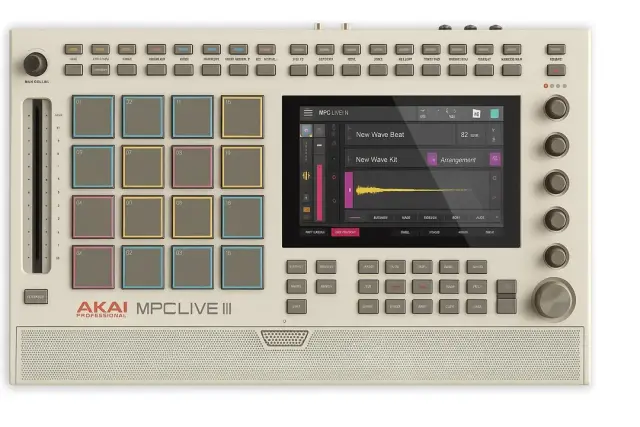
jpeg wrote:some want the live 3 retro; but its missing the grey back drop for the pads and the buttons under the screen

Image


Five Q-Links!!!! :lol:
By JackD Mon Oct 06, 2025 10:04 pm
B-Wise wrote:
JackD wrote:The Pad macros can be stored only on the sequencer buttons above, but they are actually 64 as you will have 16x4 Lines to use.


Thanks. I aware there's 64 pad macros & by default they're set to use the top pads, but in the Pad Grid or Pad FX section in the Macro menu while you're setting them up can you tap the 16 yellow pad layout on the screen at least?

May this will help understand what I'm saying:
https://www.youtube.com/watch?v=FcOTrj3 ... r4mzbLAwnn


Yes you can touch the screen to set them up, instead of pressing the button itself.
User avatar
By Ultros Mon Oct 06, 2025 10:53 pm
MPC-Tutor wrote:There’sa guy on Reddit who just tried to install mpc 2.10 on his new mpc live 3, I don’t really know where to begin with that one, assuming he’s not trolling.

Anyway it apparently allowed him to begin the downgrade but after an hour he force powered down and bricked it.


Not bricked, use PC method. bricked means FOR LIFE. that's just a corrupt rootfs installation. use the PC tool for flashing the rom back on.
By B-Wise Mon Oct 06, 2025 10:57 pm
JackD wrote:Yes you can touch the screen to set them up, instead of pressing the button itself.

Ok, but can you put the pads in Macro pad mode so that you use the drum pads?
On the Force you use a button combo or go to the Pad Grid tab in the Q-Link menu with the other macro like Screen, Project 1 & 2...
User avatar
By Lampdog Tue Oct 07, 2025 1:17 am
40Beatz wrote:Five Q-Links!!!! :lol:

That was the first thing I locked in on.
Missing buttons and quadrants too.