Support and discussion for all of Akai’s modern standalone MPCs including the MPC X / X SE, MPC Live 1, 2 & 3, MPC One / One+, MPC Key 37/61.
By pmfm Sun Nov 23, 2025 6:46 pm
I used the random feature in drum programs on my MPC Live2 and 2.5.xx a lot. 4 samples in the 4 slots ( or 1 sample with 4 different specified regions) changing the pad behavior from VELOCITY to RANDOM and that pad would play any of the 4 samples randomly. Now, on the LIVE3 with the new OS it is to working. I do basically the same thing but no matter how often I hit that pad it plays that same sample all the time.
Does anyone have a clue what I am missing or did I run into a bug?
Any info is very much appreciated as this is a key feature for me....

By Elijah Mon Nov 24, 2025 3:15 am
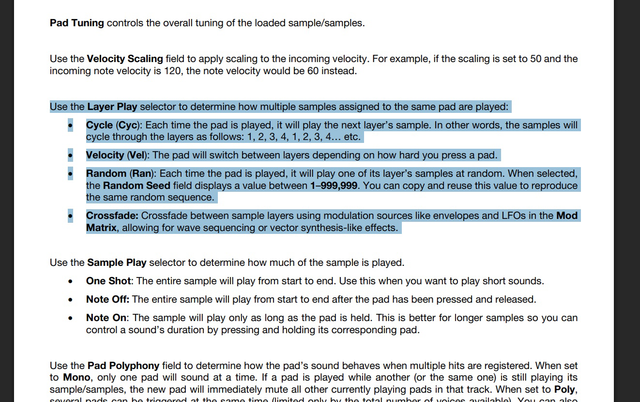
I believe you’re referring to the Layer Play feature, and it seems to be working correctly on MPC 3. Unlike MPC 2, the random order is fixed by the random seed value, so each time you play the sequence, it outputs the same “random” order.
By pmfm Mon Nov 24, 2025 6:49 pm
Random seed?
Any clue where I can find this. I tried a lot of key combos to bring some enlightenment.
But so far I can not find it. I can set a random value and amount und such for let's day
a S&H LFO but not for something simple like play randomly any of the 2 - 8 specified
samples or it's regions once I hit that pad...
By Elijah Tue Nov 25, 2025 1:51 am
pmfm wrote:Random seed?
Any clue where I can find this. I tried a lot of key combos to bring some enlightenment.
But so far I can not find it. I can set a random value and amount und such for let's day
a S&H LFO but not for something simple like play randomly any of the 2 - 8 specified
samples or it's regions once I hit that pad...

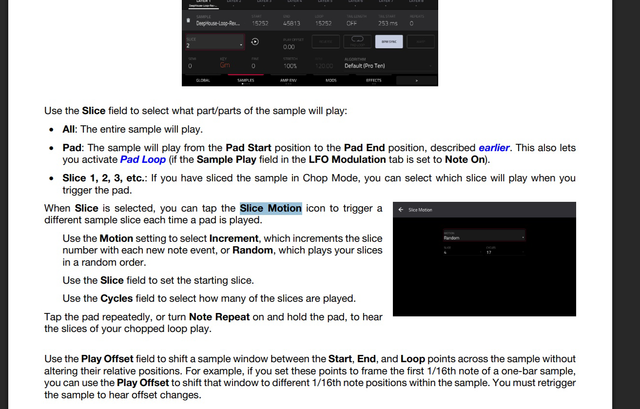
There are two ways to achieve this: Layer Play or Slice Motion. Check the manual for the details of each method.

Image

Image
By pmfm Wed Nov 26, 2025 2:49 pm
Ok, I will check this again. When you have twice the same sample but with 2 different specified regions it looks like as if the seed number equals the start point of the second sample connected to the pad.
I'm curious fand gonna find out this evening.
Thanks again!
By pmfm Tue Dec 02, 2025 4:04 pm
I'm still puzzled and not finding what I was searching for.
Yes, .....I can specify the random seed between 1 + 555000 and even more. Bu no matter what number I dial in. There will only played a different sample of any of the 8 if I change the seed number while filling around with that feature, No matter what number I dial in there is no change in which sample will be played UNLESS I change the seed number again. But it can't be automated as far as I know.
Or has anyone smart solution for me?
I would absolutely love that as this feature in 2.5 is my absolute favorite feature.
Thanks !in advance :worthy:
By Elijah Wed Dec 03, 2025 10:04 am
In MPC 3.6, both Slice Motion and Layer Play use a fixed random order, so it seems you can’t get the fully random playback behavior as in MPC 2.
By Masi Wed Dec 03, 2025 7:53 pm
Elijah wrote:Image

Awesome. They manage to descibe a non-random ranomness as a feature.

For those who want to know what is behind all this:
https://en.wikipedia.org/wiki/Pseudoran ... _generator

When you use a pseudorandom number generator in a program you usually try to find a another pseudorandom value as seed (eg something based on a current state like them or another external value that changes with each run of the program).

But at least you can change the seed for pad layers. For slices you are stuck with whatever comes up.
By Elijah Thu Dec 04, 2025 2:39 am
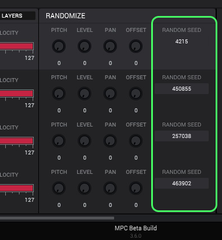
I think the random seed is a good update. Also, the software version now has a seed parameter for the Randomize function, although it isn’t available to edit in standalone.
Image
By Masi Thu Dec 04, 2025 8:51 pm
Elijah wrote:I think the random seed is a good update.

For layers I think it doesn't matter.

For slice motion (even if I could change the seed) I want a different outcome each time the sequence plays.

I didn't use it since I found out slice motion is not truly random. Does the random generator reset with a loop start or will each loop have its own variation?
By pmfm Mon Dec 08, 2025 10:47 pm
From experience it resets to the same value after every full circle of a loop. I can use a different recording of my guitar play (same progression 2-3 times) und place it precisely when I arrange a track. But when I perform live in a freestyle fashion I expect to have different results with every round of a loop to keep it all spicy and various. But that's not happening, ....unfortuantely....
Could be so simple to just play any of the 8 samples of one pad in a random fashion.
..no clue what makes this to difficult.
Anyhow, thanks guys for sharing your knowledge and experience :worthy:
By clausi Tue Mar 17, 2026 9:09 pm
I found this topic after running into the same issue and am posting to support OP.

Having a random seed is a nice feature, but it should be optional. More importantly, we should be able to trigger layers completely randomly, with the random order ever changing with every round of the loop.

The only workaround I see for now is to
a) trigger the sound without the sequencer running and record the result externally, or
b) create a sequence as long as the song I intend to make and put my randomized voices there
- which still seems needlessly cumbersome for my goal of messing about with these sounds as part of drum or percussion kits to create simple rhythm patterns. Especially when I'm still writing and might want to switch things up constantly.

So I am asking you, AKAI, to please add this feature to MPC 3 OS :worthy:
By T-Monk Thu Mar 19, 2026 5:51 am
The whole random “seed” thing was added for people who wanted randomness that remained next time they played the sequence. If you want truly random maybe just use automation and randomly put numbers in. Personally, I think you may be too caught up in the intellectual side of it. Anyone listening will either hear it as random (if they are different samples) or perceive the slight different sound as “analog” and not really pay that much attention if it is truly “random” or not.
User avatar
By MPC-Tutor Thu Mar 19, 2026 7:59 am
If you join your samples into a single sliced file (sample chain), assign only to layer 1, set layer play to velocity and then modulate slice index in the mod matrix using 'random 1' you will achieve true randomness. If you record a sequence with this, it should play differently each time.

Creating a sample chain within the MPC is however a bit convoluted, but basically create an audio track and import the samples one by one into the audio track (uncheck 'place at start). Arrange the regions efficiently to minimise unnecessary gaps. 'Bounce to sample' and chop this bounced sample. Delete the audio track (no longer needed).