Support and discussion for all of Akai’s modern standalone MPCs including the MPC X / X SE, MPC Live 1, 2 & 3, MPC One / One+, MPC Key 37/61.
By horisonten Wed Jan 14, 2026 12:10 pm
I'm going a little crazy over this one because I cannot seem to figure it out.
I know a lot of people are using the UMC1820 as an external audio interface with their MPCs, so surely some of you have figured it out.

My issue is that my gear connected to the UMC1820 using balanced cables are 6-9 dB quieter than the internal sounds on the MPC with default volume setting :hmmm:

An internal MPC drum program will jump around the 0 mark on the meter, while my external gear is around -6 to -9 dB on their respective meters.

To get the external gears volumes to jump around 0 like the internal MPC sounds, I need to feed the external gear signals into the UMC1820 so that the Clipping indicators are flashing like a christmas tree on all channels (basically constantly on).

What am I doing wrong!? Are the UMC1820 clipping indicators not actually showing when the signal is clipping? Should I simply ignore these clipping indicators and only look at the meter in my MPC?
By horisonten Wed Jan 14, 2026 2:45 pm
NearTao wrote:It's probably worth recording off of the UMC1820 and checking the wav files you record to see if you see the peaks clipping... the indicators might just be showing you "danger" without actually clipping... beyond that though... I'm not sure

Good idea, simple enough! Could be of value to others as well to actually know what the clipping indicators actually show :)
By Masi Wed Jan 14, 2026 7:41 pm
NearTao wrote:It's probably worth recording off of the UMC1820 and checking the wav files you record to see if you see the peaks clipping... the indicators might just be showing you "danger" without actually clipping... beyond that though... I'm not sure

I own a UMC1820 and can tell you that a constant red clipping indicator is clearly audible.
By Masi Wed Jan 14, 2026 7:46 pm
horisonten wrote:An internal MPC drum program will jump around the 0 mark on the meter, while my external gear is around -6 to -9 dB on their respective meters.

General mixing wisdom on the Net has it that you don't want all your tracks to hit 0 constantly. Depending on whom you ask on gain staging it is more like -10dB or even -18dB.

So turn down the internal tracks.
User avatar
By Lampdog Wed Jan 14, 2026 8:11 pm
Masi wrote:General mixing wisdom on the Net has it that you don't want all your tracks to hit 0 constantly. Depending on whom you ask on gain staging it is more like -10dB or even -18dB.

So turn down the internal tracks.

Image
By horisonten Thu Jan 15, 2026 7:49 am
Masi wrote:I own a UMC1820 and can tell you that a constant red clipping indicator is clearly audible.

Thanks for chiming in. And do you experience the same regarding internal programs vs external gear? That the internal programs are way louder than can even be achieved with the external inputs without clipping indicators going bananas?
By horisonten Thu Jan 15, 2026 8:00 am
Masi wrote:
horisonten wrote:An internal MPC drum program will jump around the 0 mark on the meter, while my external gear is around -6 to -9 dB on their respective meters.

General mixing wisdom on the Net has it that you don't want all your tracks to hit 0 constantly. Depending on whom you ask on gain staging it is more like -10dB or even -18dB.

So turn down the internal tracks.


I understand this and is what I'm going to do to keep the outputs from going over 0.

But what I do not understand the big level differences... All my connected gear are plenty loud on their own, and I have never experienced having a hard time reaching 0 levels with their outputs at 100% volume, quite the contrary.

I would have thought that the internal sounds and external gear would be equal in strength by default and then needing everything to be turned down equally. But in my case I need to keep all external gear at 100% output volume and turn down every MPC program by -10db to reach an even starting point :hmmm:
By Masi Sat Jan 17, 2026 7:30 pm
horisonten wrote:
Masi wrote:I own a UMC1820 and can tell you that a constant red clipping indicator is clearly audible.

Thanks for chiming in. And do you experience the same regarding internal programs vs external gear? That the internal programs are way louder than can even be achieved with the external inputs without clipping indicators going bananas?

Yes. Clipping on the way into the UMC1820 doesn't mean the signal is loud on the way out.

IIRC when I connect the UMC1820 to a PC I turn up the input gain when I record. Has been a while though, so I'm not sure how much.

IMHO it's odd that the MPC has no input gain slider/knob.
By horisonten Sun Jan 18, 2026 7:59 am
Masi wrote:Yes. Clipping on the way into the UMC1820 doesn't mean the signal is loud on the way out.

IIRC when I connect the UMC1820 to a PC I turn up the input gain when I record. Has been a while though, so I'm not sure how much.

IMHO it's odd that the MPC has no input gain slider/knob.

Thanks for confirming. Then I better understand whats going on!
By horisonten Sun Jan 18, 2026 8:04 am
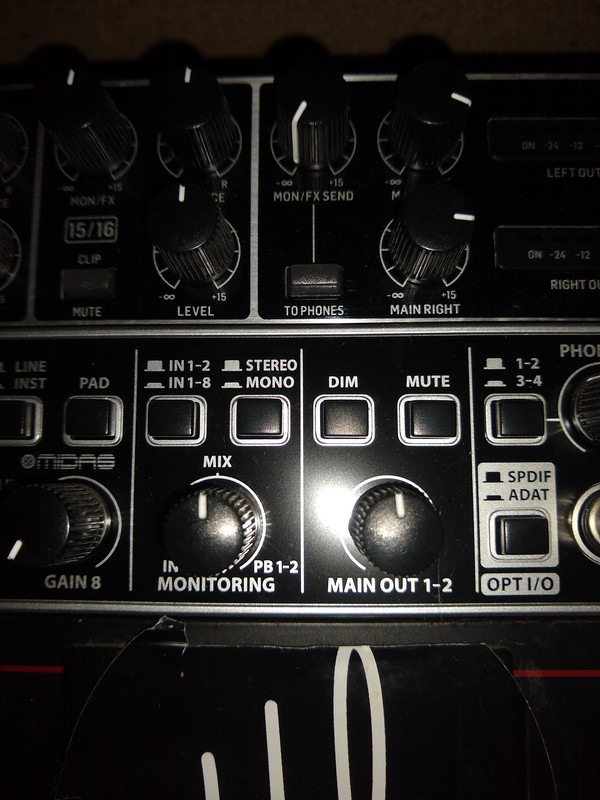
Ultros wrote:Image

Your culpret my lord. Your monitoring bias.


Not quite sure I follow. I have it all the way to the right (100% playback monitoring from the MPC) due to the short but noticable latency if I mix the incoming and playback signals :hmmm:

You mean that the middle setting would give me a matched volume?
It doesn't solve the issue that the actual input signals going into the MPC is at -9 or something dB without triggering the clipping indicators on the UMC?
User avatar
By Ultros Sun Jan 18, 2026 5:36 pm
All the way to the right monitors the soundcard, all the way to the left monitors the lines and in between sums em. generally when i have the issue you have its a result of the monitor not being fully on the digital side. Check the dim button isnt pressed in on your master. You may have something like phono / line pressed in on the lines you are sampling from.

or maybe i am misunderstanding, but it doesnt sound like an mpc problem more of a rigging issue. or.. your ballance cables are complete trash and are impeding 6-9 db of signal but thats literally what the line / phono buttons will do to your signal. powered goes into "line" unpowered goes into "phono". (the "inst/line" button on every input.) toggle em to the out position for line, and in for phono.

I have a feeling ou're driving your signal hard into it hoping it will get some gain with the line / inst (phono) buttons in the wrong positions.

always start at the device you want to record, and work your way back to the mixer and then the capture device.

if none of that is of any help, cmon back and we'll figure it out.