Forum dedicated to the new portable standalone MPC, the MPC Sample.
By amaury Fri Mar 27, 2026 8:27 pm
I think I know the answer, but in case I missed something:

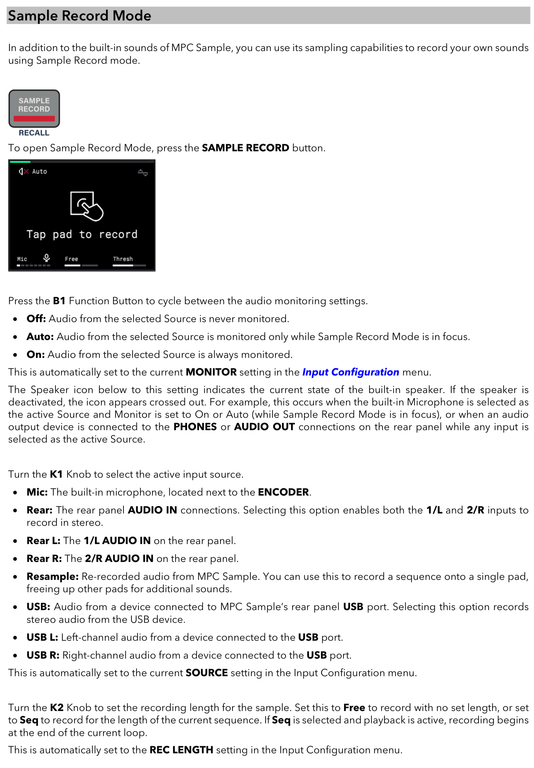
I was expecting being able to resample a 'performance' of pads playing. I engaged Record Sample, set the input to Resample, selected a pad, then started playing pads... but nothing gets recorded.

Is Resample only to resample sequences? I guess I could record my 'performance' to a sequence and then resample that. Or use the Recall feature, this seems to work...

User avatar
By Lampdog Fri Mar 27, 2026 10:59 pm
Resample is a re-recording of something already there, not a live performance.
A sample of something already there.
By Elijah Sat Mar 28, 2026 2:12 am
It seems that when you're recording to a pad, switching to another mode such as FX cancels Sample Record mode. This is similar to how sampling stops on MPC when you leave the sampler screen and move to a different page.

If the resample input in Sample Record mode can only render sequences, then it seems to do the same thing as the offline Resample function (Shift + Pad 11), which makes it feel somewhat redundant.
By amaury Sat Mar 28, 2026 6:48 am
Yes, when recording to a pad, pressing other pads record there so, no dice.

Recording in a sequence, then resampling the sequence works.. a little cumbersome but alright. I'm new to MPC so maybe it's the workflow and I'll adapt!
By dawaone Sat Mar 28, 2026 7:28 am
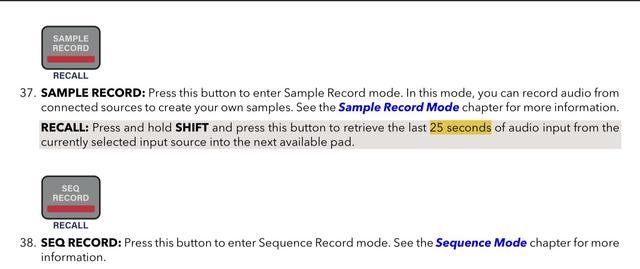
I think you need to use sample recall function for this, if you have sample input set to Resample MPC basically always resampling itself and you can access last 20 seconds of what you have played
By Wul Sun Mar 29, 2026 8:48 am
Shift + sample record recalls the last 25 secs of audio , you just have to trim it accordingly .

And I don’t have one.
By Markus303 Fri Jun 05, 2026 6:38 pm
Same problem here. I´m new to MPC an wanted to record a modification of a sample live. Didn't work.
Than I tried the solution of "Wul": (Shift + sample record recalls the last 25 secs of audio , you just have to trim it accordingly)
That works, you can choose a Pad and the MPC saves it there. BUT: there is no sound. You can see the new sample, you can play it, but you can't hear anything. (you can't SEE the sound either, the lines in the display a flat)
Someone with the same Problem? Is there a workaround for saving modifications in a Sample?
User avatar
By Lampdog Fri Jun 05, 2026 10:50 pm
dawaone wrote:…. and you can access last 20 seconds of what you have played

Markus303 wrote:That works, you can choose a Pad and the MPC saves it there. BUT: there is no sound. You can see the new sample, you can play it, but you can't hear anything. (you can't SEE the sound either, the lines in the display a flat)


Image
Image