Support and discussion for all of Akai’s modern standalone MPCs including the MPC X / X SE, MPC Live 1, 2 & 3, MPC One / One+, MPC Key 37/61.
By andy milo Mon Apr 06, 2026 1:55 pm
hey folks, I'm stuck with mundane time consuming way to apply fx on my pads one by one trying to remember whole setup of each effect and this is killing me. lets say I sampled few chops and played out them on 4 pads . now how in heaven and where I can select these pads after choosing and editing my fx so I can apply my fx setting to these 4 pads only? I tried go into effects and "apply" to 'all ... doesn't work, only work on one pad. tried to edit pad group and select multiple - still the same - only one pad has the fx on, Im relatively new to mpc and I have researched net for solution for two weeks now. nothing, some old vids that shows stuff on an old soft that doesn't look like mine ( i have 3.5 ) Please tell me what's the trick? I getting so bored to designing the FX for one pad and repeating this process on next one- Im sure there MUST be a way of sending my FX set to more than one ( few of my choice ) pads? Thank you .

User avatar
By Lampdog Mon Apr 06, 2026 2:16 pm
Use SUBMIX track.

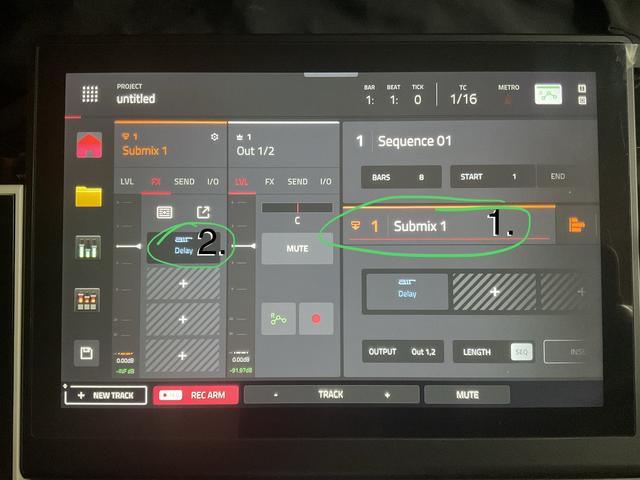
Place your effects on a SUBMIX.

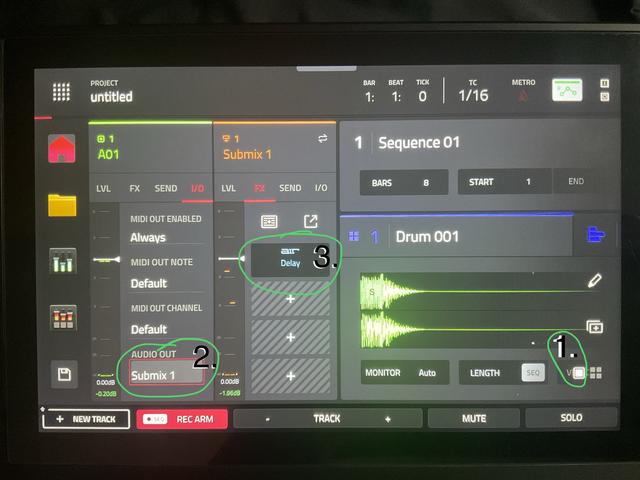
Route any number of pads to that SUBMIX.

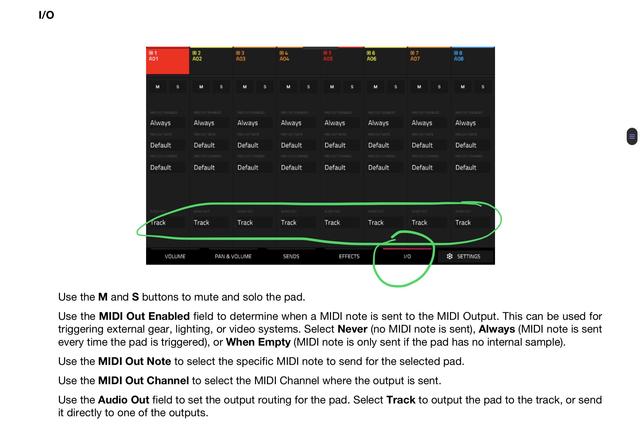
PAD MIXER, IO, at bottom, you can change from TRACK to SUBMIX’s.
Now your pads will be routed thru the submix and it’s effects and then to main outs.

You can also do this on the main menu but PAD MIXER is the better view when dealing with multiple pads/tracks.


Image
By andy milo Mon Apr 06, 2026 2:57 pm
Thanks, I did what u said , I placed delay on two of pads in submit, however the mpc just gives me some random delay, not the one I designed ? what ever I edit in effect doesn't work, the mpc just keeps giving my some random delay that i can't edit. i really don't know what's going on
By andy milo Mon Apr 06, 2026 3:15 pm
Maybe I do something wrong in wrong order? I do this: open new project.
1. loading "snare" sample into pad 9,
2. load the same "snare" sample into pad 10,11,12,
( all the same samples for the sake of exercise) , then add "delay" into first out of four slots of submit .( one with + sign.
3 .switch back to drum track.
4 go to pad mixer.
5 press i/o .
6. select sub 1 on pad 9 and 11.
7.go back to drum track .
8. there is delay some randomly chosen by mpc and Im stuck here as I don't know how to edit this to my preferences.
Ideally I would like to first : edit my desired FX then once edited transfer it to the pads i want.
Your solution only pushed me forwards to achieving the FX to desirable pad however no able to "transfer the settings of the FX it as doesn't matter how much time I spend on editing my mpc keep playing the same randomly chosen delay. so I need to edit it anyway , so go back to square one ;-)
I noticed I can edit the
Last edited by andy milo on Mon Apr 06, 2026 3:45 pm, edited 1 time in total.
By B-Wise Mon Apr 06, 2026 4:36 pm
The pad fx are just for that pad. Track fx are for all the pads in that track. Submix fx are any track or pad you send to it within the whole project. Assign an fx to one of the 8 submixes & then send all the pads you want to share the same fx to that submix like in the screenshot Lampdog posted.
User avatar
By Lampdog Mon Apr 06, 2026 4:39 pm
I don’t think your MPC is giving you random efx.
I feel like some efx are assigned somewhere and you forgot/don’t realize it yet..
TRACK EFX?
SEND EFX?
PAD EFX?

If all else fails start a new project and add 1 pad at a time to the submix

You can tap “2.” here to edit your submix efx.

Image

You can tap “3.” here to edit your submix efx.

Image

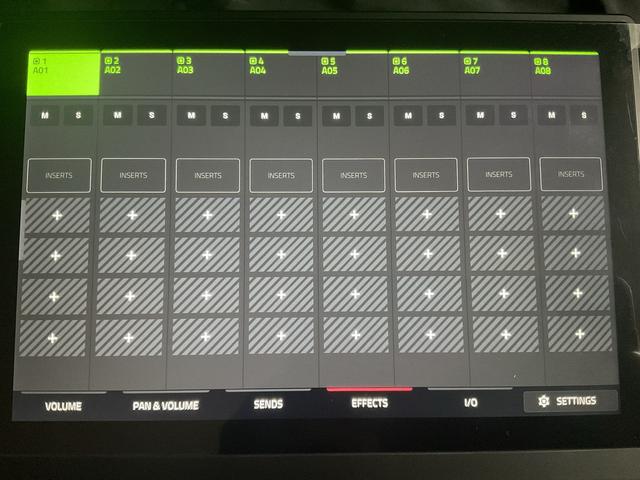
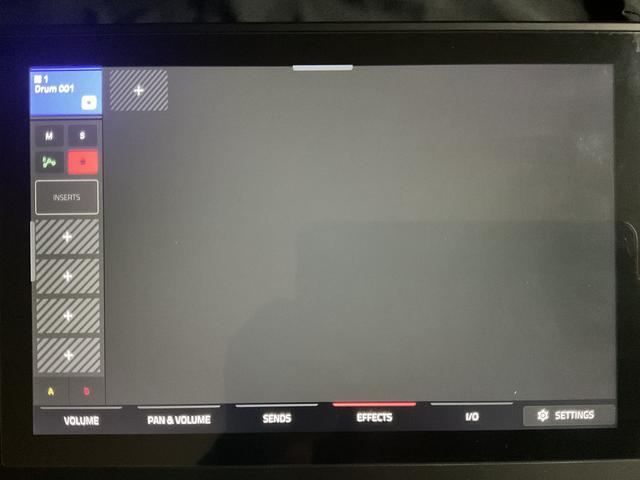
Make sure you have no individual pad efx going on.

Image

Make sure you have no track efx going on.

Image

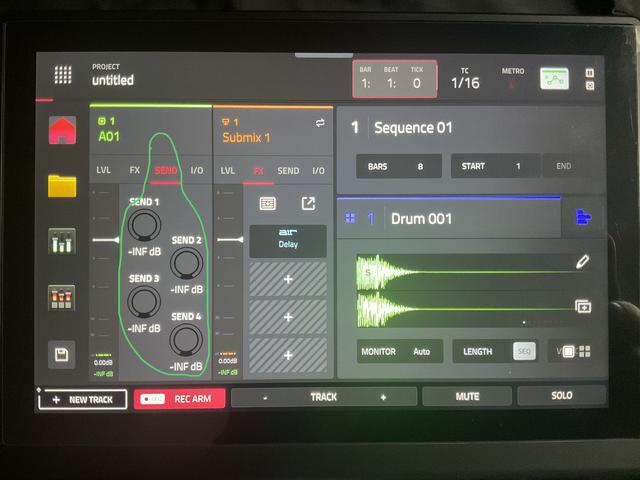
Make sure you have no send efx going on, turn these all the way down on each of your target pads.

Image


By andy milo Mon Apr 06, 2026 4:57 pm
guys, thank you so much. I will try from scratch again and tell you if it works. I find the way Im doing it so far too much time consuming hence try to find the trick to add my fully edited FX to other pads I really appreciate your help. ( good guitar player but I suck when comes to technical issues and get really flustered ;-)
EDIT: yes it works!!!!! thanks you so much again . you are amaaaazing :worthy: