


By Certified Beatz
Fri Apr 17, 2026 10:45 am
Lampdog wrote:Delphinus wrote:Also, thanks for the earlier hot tips Lamp. Already utilizing the volume from touch slider option.
I’ve used the touch strip as a/b fader as well.
Make a beat on trk “a”, highlight “a” at bottom of channel strip
Make a beat on trk “b”, highlight “b” at bottom of channel strip
Config touch strip to “crossfader”.
You can now hit play and fade between “a” and “b” tracks.
You could set multiple tracks to “a”.
You could set multiple tracks to “b”.
This could result in you fading between 2 songs, on the fly, if prepped properly.
—————
You can do this same thing on machines without the touch strip, utilize a q-link!
Make a beat on DRUM 001 (it’s just a drum track)
Make a beat on DRUM 002 (it’s just a drum track)
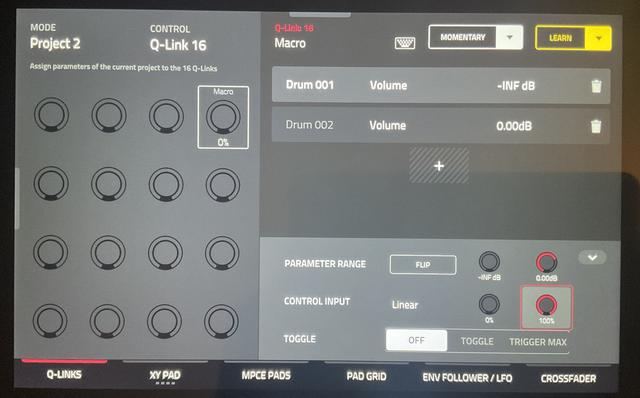
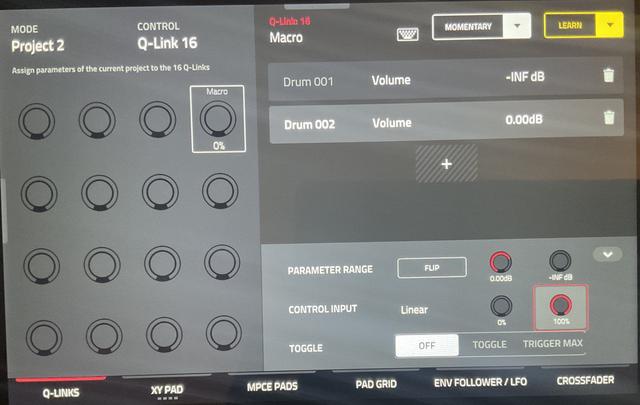
Q-link Edit
Project 2
Q-link 16 (any empty q-link will work)
Follow my pics.
Add macro, track, DRUM 001, mixer, volume, at bottom, “parameter range” is set to 0.00db
Add macro, track, DRUM 002, mixer, volume, at bottom, “parameter range” is set to 0.00db
DRUM 002 at bottom, “parameter range” is “flipped”
You can know fade between DRUM 001 AND DRUM 002 volume levels on the fly.
Definitely going to try thank you I would have thouof it



