By fstrat76
Wed Jul 15, 2026 1:47 pm
I have a very strange issue inserting clip rows on my MPC XL 3.9 standalone.
Created clips in the clip matrix, each row being a section like a verse, intro, bridge. There are four tracks: Drums, bass, plugin synth, and guitar. Row 1 Intro, Row 2 Verse.
Row 1 Synth clip 1 plays fine, but I do not play the synth in the verse in Row 2, so the cell is empty. Clicking the right play row 1 or 2, all is working as expected.
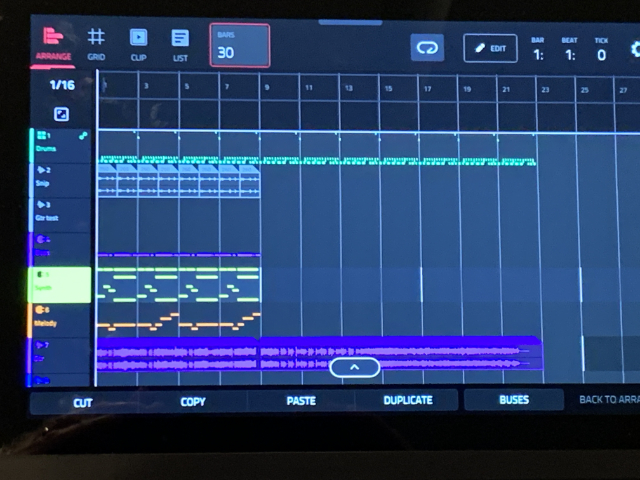
In Arrange mode, the arrangement is clear, I select Insert Clip Row, select Row 1 (8 bar intro) to bar 1. I Insert Clip Row 2 (14 bars) at bar 9.
I look at the arrangement and everything looks great. I hit play and it plays the first 8 bars correctly. When playback hits bar 9, the synth continues to play the notes from bars 1-8 even though there are no notes shown in the arranger for that synth track in bars 9 . I turned off the loop on the synth row 1 clip but same issue. Have had this happen with an Audio track as well.
This is just one example. I have had other issues with inserting clip rows; while the arranger looks correct (correct notes, tracks, etc), it plays other sections at the beginning that are clearly not part of the arrangement at that position. Very odd.
I am either missing something critical, or the insert clip row feature is not working as expected.
Any thoughts?
(edited for clarity)
Created clips in the clip matrix, each row being a section like a verse, intro, bridge. There are four tracks: Drums, bass, plugin synth, and guitar. Row 1 Intro, Row 2 Verse.
Row 1 Synth clip 1 plays fine, but I do not play the synth in the verse in Row 2, so the cell is empty. Clicking the right play row 1 or 2, all is working as expected.
In Arrange mode, the arrangement is clear, I select Insert Clip Row, select Row 1 (8 bar intro) to bar 1. I Insert Clip Row 2 (14 bars) at bar 9.
I look at the arrangement and everything looks great. I hit play and it plays the first 8 bars correctly. When playback hits bar 9, the synth continues to play the notes from bars 1-8 even though there are no notes shown in the arranger for that synth track in bars 9 . I turned off the loop on the synth row 1 clip but same issue. Have had this happen with an Audio track as well.
This is just one example. I have had other issues with inserting clip rows; while the arranger looks correct (correct notes, tracks, etc), it plays other sections at the beginning that are clearly not part of the arrangement at that position. Very odd.
I am either missing something critical, or the insert clip row feature is not working as expected.
Any thoughts?
(edited for clarity)