Support and discussion for all of Akai’s modern standalone MPCs including the MPC X / X SE, MPC Live 1, 2 & 3, MPC One / One+, MPC Key 37/61.
User avatar
By bliprock Wed Mar 24, 2021 3:45 am
Soooo, if you hit stop and overdub or stop and record, while in track mute window and hit mutes then play, it ignores the mutes you entered and then any tracks you muted in this state then change back on when play is hit.

I want to do precise mute tracks of multiple tracks, say a dozen at once. Now I am not sure, but I think I have to set every track to IN and then because I have a lot of automation that I want to hear I then have to then go back and change every single track to Auto, or merge from memory.

This is just incredibly frustrating when you have more than say a dozen tracks going with automation that you want to hear, then decide I want to mute a stuff, because I have to change the status on every track, and it is so time consuming and also just seems wrong. Am I missing something here?

Also the whole track arm status changes when you go from main window to track view. Is that a bug? or what? And to top all that off, if you hit shift+Arm in track view it wont REC ARM all tracks at all but seems to in main window, but it is hard to tell as it is only showing one track at a time.

So how do I simply record in stop record with automation in track mute screen with lots of tracks and with automation?

Please do not suggest using the sequence list view, it is not conducive to working with say over 16 tracks. Especially when this should be a simple thing that I can do in stop record mode in the track mute screen.
thanks
User avatar
By bliprock Fri Mar 26, 2021 7:44 am
yeah not really a solution as I am doing different mute changes this way and that means you only get one way to change the mutes and also still don't work. Submixes isn't gonna work either.
Its about the MPC seeing mute track changes in stop-record mode and how it catches them, so related to the option of "Place Events Recorded During Count-In at Start Point:" In the options. Also play and record mute events.
Imagine you a long sequence and you are at 170BPM and you have 24 tracks, you want to record mutes exactly at say bar 2, so 12 are muted, then switch to 6 muted half way through a bar, then at start of next bar you want to unmute all of them, then next bar you want to mute another DIFFERENT 12 tracks.

See how playing it in is not and option and how list edit mode is gonna be really slow and hard. IF this worked this arranging mutes would take a second not 10 minutes.
IT should work., If you are in stop record mode and unmutes are in the sequence, and then you mute pads then start record-play the mutes you just turned on turn off .. WTF

I MEAN WTF AKAI... not only does it ignore your PAD or TRACK MUTES, it changes them right in front of you... SO god damn frustrating and so god same stupid. IT SHOULD WORK. I just don't get how no one knows A, what I am on about, B, no one else in the world does this and why C it just don't work. It should see the change in automation, especially with "Place Events Recorded During Count-In at Start Point:" ON and record mutes setting ON.

No one seems to know an answer so no way I can confirm it is a bug. If you do it what I am trying to do, it just is obvious it should work. Why no automation in STOP- -RECORD?

TO BE SUPER CLEAR here and for trouble shooting purposes I want people to try this..
Got to options
Place Events Recorded During Count-In at Start Point: ON
Play Track Mute and Solo Events: ON
Record Track Mute and Solo Events: ON

Now go to first 4 tracks.
ARM them
set tracks status 1-4 as OFF, ON, MERGE, AUTO
now tracks 5-8 NOT ARMED
Set track status to OFF OM MERGE AUTO
Now we have an example of every combo
NOW set Global Automation to ON.

NOTHING WORKs
User avatar
By saltmcgault Fri Mar 26, 2021 2:26 pm
viewtopic.php?f=48&t=185258&p=1798867&hilit=MUTE+SOLO#p1798867


Go to preferences and turn record track mute/solo to "off". I haven't had and issue with it since. If you are trying to implement the track mute solo function into your project. The best way to do this is create separate sequences you wished to use the track mute/solo feature in and delete the events you wished muted in grid edit. That's what I've been doing. I know... it sucks.
User avatar
By bliprock Sat Mar 27, 2021 12:43 am
Nope this does not work. Turning that off obviously means you get no mute events recorded, and yeah works as expected it wont record events. I am thinking it is a bug, but still how can I be the only person that is trying this.. I mean that also does not make any sense at all
By Yorgos Arabatzis Sat Mar 27, 2021 1:43 pm
I don’t know if you’re after this or is it of any help but this is what i’ve posted on the lost tips & tricks thread long time ago..

“ You all know that there's no REC/Automation option inside Track Mute menu and there's no way to Mute tracks and at the same time automate Q-Links...Although it's a wonderful feature request (hear..hear..AKAI) a poor man's workaround at this point is to enable automation in main screen (W) and while in Track Mute menu Hold Q-Link button and move the knob you want to automate.Bam!Automation inside Track Mutes!”

I’m a moderator at Official Sequential forum and my sticky tips & tricks thread is one of the most enlightening and helpful resource that anyone can find there..
I encourage MPC-Tutor or Lampdog to do the same, make a sticky one and update it constantly.Saved my ass many times when people starting asking questions to this and that..
User avatar
By saltmcgault Sat Mar 27, 2021 2:38 pm
bliprock wrote:Nope this does not work. Turning that off obviously means you get no mute events recorded, and yeah works as expected it wont record events. I am thinking it is a bug, but still how can I be the only person that is trying this..


You're not the only one. I used track mutes on the 2500 on nearly every project. I'm not impressed with the track mut/solo functions on the X. Its hard to say whats a bug when i feel like its been **** since the 1st time I've used it. So instead of giving my X a couple of new names. I went the route I mentioned above. Gray hairs are sprouting at a slower rate now.
By Yorgos Arabatzis Sat Mar 27, 2021 7:36 pm
Ok i got what you’re saying..
Ye i must agree about your frustration..
What i do is when i start recording i quickly mute/unmute the pads i want to be muted and then go to every pads automation lane and set them manually to start muted..This only happens at the beginning of the track after that every automation is recorded as expected..Ye i know bummer but i don’t know any other way..
User avatar
By bliprock Sun Mar 28, 2021 2:29 am
thanks a lot for the tips. I reported it as a bug to Akai, see if anything happens and will try the idea above soon. Yeh it does seem broken and a bug doesn't it. hmmm
User avatar
By bliprock Sun Mar 28, 2021 10:24 am
see the button called REC, see the other button called OVER DUB.. hit them. What happens SakisX? it flashes don't it... yeah that is called STOP_RECORD MODE. Get it yet?

Now in track mute screen, hit a pad, see it change, that is a tack mute. Now for the combo move? ready, go into stop record mode, tack mute some tracks, hit play. Mpc Live and X don't recognise that change. Can not make it any simpler than this, so yeah if you don't get that then yikes not much we can do for ya lol.. But seems a bug is there... Hell it even resets and changes the mute track status on play AFTER you change it and changes back to what it was.. That has to be a bug. For it to actually change back after you change in stop record on play is not good.
User avatar
By Lampdog Sun Mar 28, 2021 2:36 pm
bliprock wrote:Now in track mute screen, hit a pad, see it change, that is a tack mute. Now for the combo move? ready, go into stop record mode, tack mute some tracks, hit play.


Used an existing project. I did this and when played back my mutes were automated exactly as played.

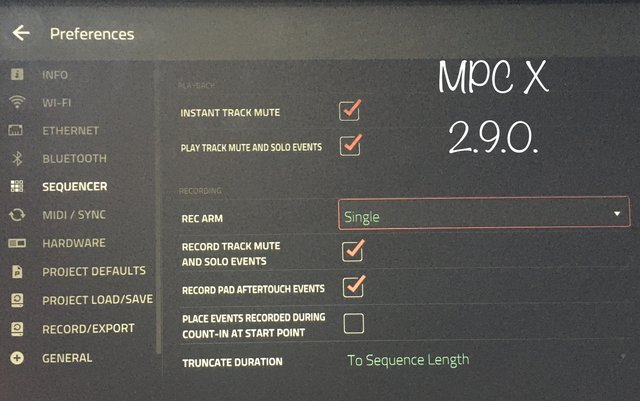
Also this is what my preferences/sequencer screen is set to.


Image
By SakisX Sun Mar 28, 2021 2:40 pm
bliprock wrote:see the button called REC, see the other button called OVER DUB.. hit them. What happens SakisX? it flashes don't it... yeah that is called STOP_RECORD MODE. Get it yet?


So far so good :)

bliprock wrote:Now in track mute screen, hit a pad, see it change, that is a tack mute. Now for the combo move? ready, go into stop record mode, tack mute some tracks, hit play. Mpc Live and X don't recognise that change.


press overdub first then play and during count-in hit the mutes, all recorded* :)

bliprock wrote:Hell it even resets and changes the mute track status on play AFTER you change it and changes back to what it was.. That has to be a bug. For it to actually change back after you change in stop record on play is not good.


I don't get it :(

*during count-in events are recorded . So pressing overdub first and then going to the first or second bar (unfortunately it resets to the closest beat not between don't know if it's possible to change it) , you can place the mutes (during count-in)

But if you need precision I'd simply edit the track mute automation
I didn't know that MPC is supposed to record events when pressing overdub