Support and discussion for all of Akai’s modern standalone MPCs including the MPC X / X SE, MPC Live 1, 2 & 3, MPC One / One+, MPC Key 37/61.
By creamofbeats Wed Jul 13, 2022 12:13 am
I'm new to the X, so be easy.
I've also looked at the manual, checked YouTube, called friends, and used the search function.
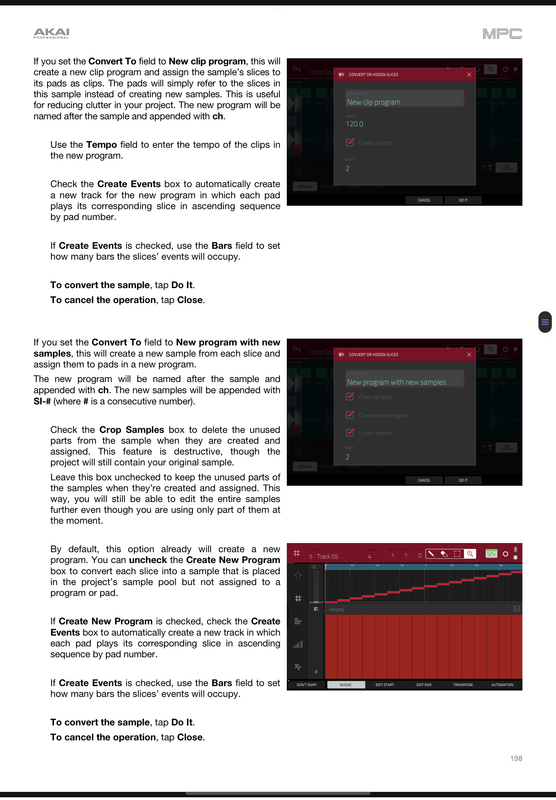
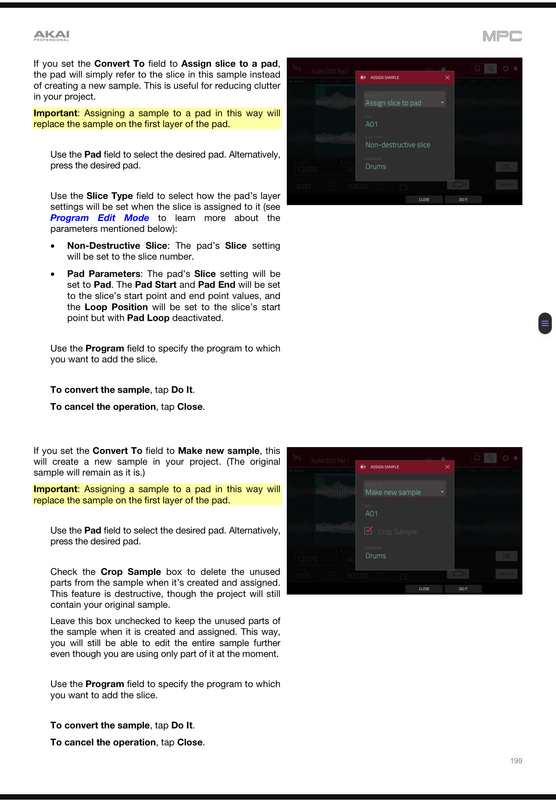
Ok, so I have a sample in the MPC already. I set my slice points, but the convert will only allow me to create a new program. Coming from 2500, I was able to process the slices and assign them to the pads manually. I know there has to be a way to do this. We have 8 banks per program to store samples, so if I only need to create 5 chops, a whole new program seems unnecessary.
Also, the ducking compressor. I know how to use it, but I chop small. A usual beat might have 16+ chops just for the main sample. How can I apply the same ducking settings to all the samples?

CREAM OF BEATS. DETROIT. MPC-X
https://soundcloud.com/cream-of-beats

By creamofbeats Wed Jul 13, 2022 12:10 pm
Lampdog wrote:Creamofbeats, same creamofbeats YEARS ago when Prah rocked on your beat?


What up Lamp!
Yezzir! I took one heck of a hiatus getting myself after the 08 recession. Quit my old job, became a journeyman carpenter and got a worst job, now I work for myself!
I never really stopped making beats, but the daily hunger to create was gone. I'd be lucky to make 2 beats a year! The poor 2500 became a dinner plate holder for a long time! :lol:

CREAM OF BEATS. DETROIT. MPC-X
https://soundcloud.com/cream-of-beats

User avatar
By Lampdog Wed Jul 13, 2022 12:47 pm
I think you may be talking about one of these pages.
TRIM/CHOP & PROGRAM buttons at the bottom give diff options when you PROCESS / CONVERT ALL. Check all those tabs and scroll downs. I have an MPC X also. V2.11.2.


:arrow: MPC 2.11 Standalone User Guide (73.24 MB)

:arrow: MPC 2.11 Desktop Software and Firmware Update Release Notes (181.27 kB)

Image
Image
By 40Beatz Wed Jul 13, 2022 2:17 pm
creamofbeats wrote: The poor 2500 became a dinner plate holder for a long time! :lol:


Unfortunately My 5000 Pads have become that exact thing :lol:
By creamofbeats Fri Jul 15, 2022 4:10 am
Lampdog wrote:I think you may be talking about one of these pages.
TRIM/CHOP & PROGRAM buttons at the bottom give diff options when you PROCESS / CONVERT ALL. Check all those tabs and scroll downs. I have an MPC X also. V2.11.2.


:arrow: MPC 2.11 Standalone User Guide (73.24 MB)

:arrow: MPC 2.11 Desktop Software and Firmware Update Release Notes (181.27 kB)

Image
Image


Thanks Lamp, I figured it out a few days ago. Even got he ducking woking (applied it to The whole program.) works like a charm. Totally loving this X. :worthy:

CREAM OF BEATS. DETROIT. MPC-X
https://soundcloud.com/cream-of-beats
User avatar
By Lampdog Fri Jul 15, 2022 4:14 am
creamofbeats wrote:Totally loving this X. :worthy:

I powered on my 2kxl and 4k a while back, it's hard to go back.
I was struggling, annoyed, slow, frustrated. Turned on X, I was happy again.
By 40Beatz Fri Jul 15, 2022 2:54 pm
When I fire up my 4000, I find myself tapping on the screen alot :lol:

4000 is a Powerful Machine, but very tedious for things like Naming Tracks/Projects, Sample Editing, etc

Never Gettin rid of it tho